
GDPR. CCPA. Cookie consent. Privacy policies. Data retention. User rights.
If you run a WordPress site and these terms make your head spin, you are not alone. Most small business owners and bloggers did not launch a website to become compliance experts. But privacy regulations in 2026 are more active than ever, and the assumption that these laws only apply to large companies is one of the most common and costly misconceptions in the WordPress space.
The good news is that WordPress GDPR compliance does not have to be complicated. You do not need a legal background or a dedicated compliance team. What you do need is a clear checklist, an honest look at your site, and the right tools to fill in the gaps.
This guide gives you exactly that. Work through it section by section, and by the end you will know precisely where your site stands and what still needs attention.
What Are GDPR and CCPA, and Why Do They Matter for Your WordPress Site?
Before getting into the checklist, it helps to understand what you are actually dealing with.
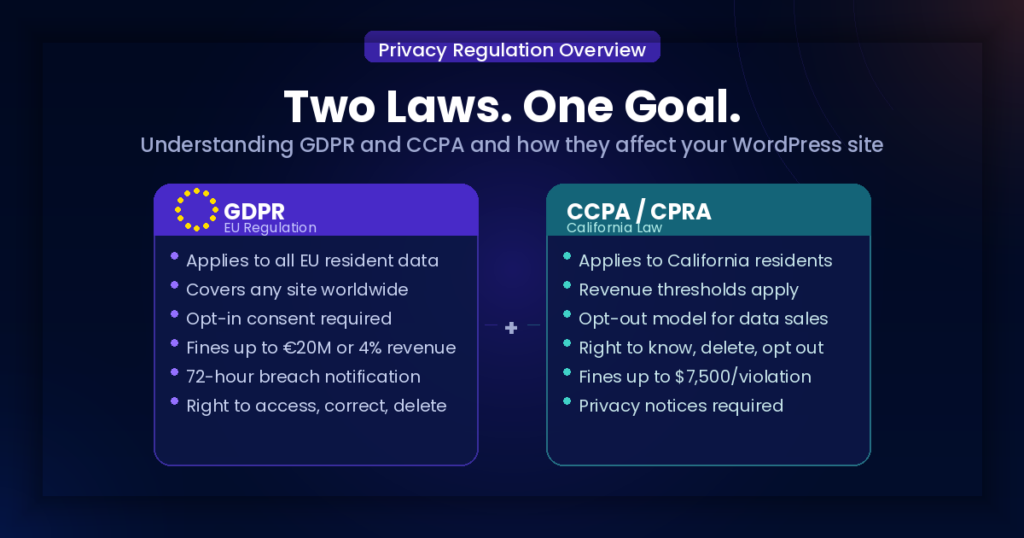
GDPR stands for General Data Protection Regulation. It is an EU law that governs how personal data of people in the European Economic Area is collected, stored, used, and shared. The key point most WordPress site owners miss is that GDPR does not only apply to businesses based in the EU. If your site is accessible to EU visitors and you collect their personal data in any form, GDPR may apply to you regardless of where you or your business are located.
CCPA stands for the California Consumer Privacy Act, now strengthened by the CPRA (California Privacy Rights Act). CCPA requirements for small businesses focus on transparency around personal data collection, the right to opt out of data sales, and the right to access or delete personal information. CCPA applies to certain businesses that collect data from California residents and meet specific thresholds, but given that California is the most populous US state and a major source of web traffic, many WordPress site owners are affected without realising it.
Together, GDPR and CCPA represent the two most widely referenced privacy frameworks for website owners in 2026. Meeting their core requirements also puts you in a much stronger position against the growing number of state-level privacy laws now active across the US.
Does Your WordPress Site Actually Need to Comply?
This is the first question most site owners ask, and it is the right one to start with.
For GDPR, ask yourself: do you receive visitors from the EU? Do you collect emails, names, or any other personal data from EU-based users? Do you use analytics tools, advertising pixels, or contact forms that capture user information? If yes to any of these, GDPR is likely relevant to your site.
For CCPA compliance checklist 2026 purposes, the formal thresholds are: annual gross revenue above 25 million dollars, buying or selling personal data of 100,000 or more consumers per year, or deriving more than 50 percent of annual revenue from selling personal data. Most small WordPress sites do not meet these thresholds. However, California residents make up a significant portion of English-language web traffic, and demonstrating transparency around their data is both good practice and a way to future-proof your site as regulations tighten.
For GDPR and CCPA requirements for small businesses in general, the core principle is the same across both frameworks: be transparent about what data you collect, give users meaningful control over it, and protect it responsibly.
The Complete GDPR and CCPA Compliance Checklist for WordPress Sites
Work through each section below and mark off what is already in place on your site. Anything unchecked is an action item.
Section 1: Legal Pages
Legal pages are the foundation of any compliant WordPress site. Without them, nothing else in this checklist matters.
Most site owners underestimate how specific these pages need to be. A Privacy Policy that was generated two years ago and never revisited is one of the most common compliance gaps we see on WordPress sites. Tools get added, email providers change, ad pixels get installed and the privacy policy silently stops reflecting what the site actually does. Under GDPR, your privacy policy must accurately reflect your current data practices. A generic template that lists services you do not use, or omits ones you do, is not compliant even if it looks professional.
- Your site has a published Privacy Policy that accurately describes your data collection and use
- Your Privacy Policy meets GDPR privacy policy requirements, including lawful basis for processing, data retention periods, user rights, and third-party data sharing
- Your Privacy Policy addresses CCPA requirements if your site serves California residents
- Your site has a Terms and Conditions page
- Your site has a Cookie Policy or cookie disclosure that explains what cookies are used and why
- Your site has a Disclaimer if you publish advice, affiliate content, or educational material
- Your site has a Refund Policy if you sell products or services
- All legal pages are easy to find, with links in the footer at minimum
The footer link matters more than most site owners think. Regulators and ad networks both check for it specifically. A privacy policy buried three clicks deep in a menu does not satisfy the accessibility standard that GDPR expects. If you need to create or update any of these pages, Legal Pages lets you generate all of them directly from your WordPress dashboard.
Section 2: Cookie Consent
WordPress cookie consent GDPR requirements are one of the areas where sites most commonly fall short, because it is easy to assume that simply having a cookie notice is enough. It is not.
The distinction that trips up most WordPress sites is the difference between a cookie banner that informs and one that actually controls. A banner that says “This site uses cookies by continuing to browse you agree” is not compliant under GDPR. Consent must be actively given, not implied by continued use. More importantly, non-essential cookies must not load until that consent is recorded. If your Google Analytics tag fires the moment someone lands on your page regardless of what they click, your banner is decorative.
- Your site displays a cookie consent banner before non-essential cookies are loaded
- The banner gives users a genuine choice to accept or decline non-essential cookies
- Accepting and declining are equally easy options (no pre-ticked boxes or dark patterns)
- Non-essential cookies do not load until the user has given consent
- Users can change or withdraw their cookie preferences at any time
- Your cookie banner links to your full Cookie Policy
- Consent records are logged so you can demonstrate compliance if needed
The key distinction is between essential and non-essential cookies. Functional cookies that keep a user logged in or remember basket contents do not require prior consent under most frameworks. Analytics cookies, advertising cookies, and retargeting pixels do. If your Google Analytics or Facebook Pixel loads before a user has consented to anything, that is a compliance gap regardless of how good your privacy policy is.
Section 3: Privacy Policy Content
Your privacy policy is the most important compliance document on your site. This section checks whether it actually contains what GDPR and CCPA require, not just whether a page with that title exists.
This is where the difference between a real compliance document and a template becomes clear. GDPR is explicit that a privacy policy must include the lawful basis for each type of data processing. That means it is not enough to say “we collect your email to send you newsletters.” You need to state the legal ground, in that case, consent and make clear that the person can withdraw that consent at any time. Most generic templates skip this entirely.
- Identifies who you are and how to contact you
- Lists the categories of personal data you collect
- Explains the purposes for which data is collected and used
- States the lawful basis for each type of processing (required under GDPR)
- Discloses all third-party services that receive user data
- Explains how long data is retained
- Describes the rights users have over their data
- Explains how users can exercise those rights and contact you to do so
- Addresses international data transfers if applicable
- Includes a date showing when it was last updated
The date is a small detail that gets overlooked. Regulators and privacy-aware users check it. A policy dated 2021 on a site running a 2024 analytics setup immediately signals that it has not been maintained.
Section 4: User Rights and Data Requests
Both GDPR and CCPA give users rights over their personal data. Your site needs a clear process for handling those requests.
The rights themselves are well known; access, correction, deletion, and under CCPA, the right to opt out of data sales. What is less discussed is that having these rights listed in your privacy policy is only half the requirement. You also need a documented, functional process for actually responding to them. Under GDPR, you have 30 days to respond to a data subject request. If someone emails asking what data you hold on them and you have no process to answer that, you are not compliant regardless of what your policy says.
- Users can request access to the personal data you hold about them
- Users can request correction of inaccurate data
- Users can request deletion of their data where applicable
- CCPA users can opt out of having their data sold or shared for advertising purposes if applicable
- You have a process in place to respond to data subject requests within the required timeframe (30 days under GDPR)
- Your privacy policy explains how users can submit these requests
For most small WordPress sites, this does not require complex infrastructure. A dedicated email address for privacy requests and a written internal process for handling them is a reasonable starting point. The key is that it works in practice, not just on paper.
Section 5: Third-Party Tools and Plugins
Most WordPress sites rely on several third-party tools, and each one that processes user data is a compliance consideration.
This is the section that surprises site owners most. It is easy to think of data collection as something you actively set up. In reality, every plugin you install that phones home to an external server, every analytics script you add, and every advertising pixel you fire is a data sharing arrangement that needs to be disclosed. Under GDPR, you are responsible for ensuring the third parties you use handle data appropriately. That means you should have at least a basic understanding of how each tool treats user data and be able to reflect that in your privacy policy.
- You have identified every third-party service that receives personal data from your site
- Each service is mentioned in your privacy policy
- You have reviewed the privacy policies of those services to understand how they handle data
- You are not using tools that collect data you do not need
- Any tools that require cookie consent are blocked from loading before consent is given
Common tools to check include Google Analytics, Google Tag Manager, Facebook Pixel, Hotjar, Mailchimp, Klaviyo, HubSpot, Stripe, PayPal, Disqus, and any booking, CRM, or live chat plugins. If it processes visitor data, it belongs in your privacy policy and your consent management setup.
Section 6: Forms and Data Collection Points
Every form on your site is a potential data collection point, and each one needs to be treated as such.
The most common mistake here is the pre-ticked opt-in box. It is still widespread despite being explicitly prohibited under GDPR. Consent must be freely given, specific, informed, and unambiguous. A checkbox that is ticked by default does not meet any of those criteria. Neither does a statement buried in your terms that says something like “by submitting this form you agree to receive marketing emails.” Both are invalid as a legal basis for adding someone to a mailing list.
- Contact forms clearly state why information is being collected
- Newsletter signup forms include a clear description of what subscribers will receive
- Checkout forms link to your privacy policy and terms
- Account registration pages link to your privacy policy
- Forms do not collect more information than is actually needed
- Where consent is required before adding someone to a mailing list, an unchecked opt-in checkbox is used
Data minimisation is also worth taking seriously here. Collecting a phone number on a contact form when you only ever respond by email is the kind of unnecessary data collection that GDPR specifically discourages. Collect what you need, nothing more.
Section 7: Data Security
Compliance is not only about legal pages and consent banners. How you protect user data matters too, and this is an area GDPR takes seriously.
A security breach that exposes user data can trigger mandatory notification requirements under GDPR. If your site stores any personal data and that data is compromised, you may be required to notify the relevant supervisory authority within 72 hours. That clock starts from when you become aware of the breach, not when it is resolved. Having basic security hygiene in place is not only good practice, it is directly connected to your compliance obligations.
- Your site uses HTTPS with an active SSL certificate
- You use strong passwords and two-factor authentication for admin accounts
- Your WordPress core, themes, and plugins are kept up to date
- You use a reputable security plugin to monitor for threats
- You have a backup system in place
- User data stored on your site is limited to what is necessary
Outdated plugins are the single most common entry point for WordPress site compromises. Keeping everything updated is not just a performance consideration, it is a data protection measure.
The Most Common GDPR Mistakes WordPress Sites Make
Running through the checklist above will catch most issues, but a few mistakes come up so consistently that they are worth calling out directly.
Using a cookie banner that does not actually block cookies. Many WordPress cookie notice plugins display a banner but do not integrate with your analytics or advertising tags to block them before consent. The banner exists but the cookies fire anyway. This is the most widespread compliance gap on WordPress sites and it is entirely invisible to the site owner unless they specifically test it.
Having a privacy policy that does not match what the site actually does. Outdated policies, copied templates, or policies generated for a different type of site all create a gap between what you claim and what you do. That gap is exactly what regulators look for.
Treating GDPR and CCPA as a one-time task. Compliance is not a checkbox you tick at launch. Every time you add a new plugin, change your email provider, install a new pixel, or change how you collect data, your privacy policy and consent setup may need to be updated. Building a habit of reviewing your legal pages whenever you make a significant change to your site setup is the most practical way to stay current.
Confusing a disclaimer with a privacy policy. These serve different purposes. A disclaimer limits your liability around content. A privacy policy discloses your data practices. You likely need both, but they are not interchangeable.
How to Make Your WordPress Site GDPR Compliant: The Practical Path
Knowing what is required is one thing. Getting it in place efficiently is another.
Step 1: Audit what your site actually collects. Before you write or update any legal page, spend 20 minutes going through your site as a visitor would. Submit a contact form. Sign up for your newsletter. Go through checkout if you have one. Check your installed plugins and identify every one that sends data to an external service. This audit is the foundation. Any legal page you write without doing it first will be incomplete.
Step 2: Get your legal pages in order. A Privacy Policy, Terms and Conditions, Cookie Policy, and any other relevant pages need to be live, accurate, and easy to find. The key word is accurate, your policy needs to reflect what you found in Step 1, not what you think your site does or what a generic template assumes. Using Legal Pages lets you generate these directly inside WordPress using your own site details, rather than starting from a blank document or adapting a template built for a different type of business.
Step 3: Set up proper cookie consent. Install a WordPress GDPR compliance plugin that handles cookie consent correctly. This means blocking non-essential cookies before consent is given, not just displaying a notice. It means presenting users with a genuine accept or decline choice. And it means logging consent records so you can demonstrate compliance if you are ever asked. A GDPR compliance WordPress plugin with built-in consent management handles most of this automatically, but verify that it actually blocks your analytics and advertising tags before they fire, not all plugins do this by default.
Step 4: Review your forms and data collection points. Go through every form on your site using Section 6 of the checklist. Check for pre-ticked boxes, missing privacy policy links, and unnecessary data fields. This step takes less than an hour for most sites but is one of the most frequently skipped.
Step 5: Set a reminder to review quarterly. Compliance is not a one-time task. Add a recurring calendar reminder to review your privacy policy and consent setup every three months, or any time you add a new tool to your site. Five minutes of review now is far less costly than discovering a gap after traffic starts arriving.
This does not need to be done all at once. Prioritise legal pages first, then cookie consent, then the forms review. A site that is actively working toward compliance is in a far better position than one that has done nothing at all.
Frequently Asked Questions
Does GDPR apply to small business websites?
Yes. GDPR applies based on the data you process and who you process it for, not the size of your business. If you collect personal data from EU residents in any form through a contact form, newsletter signup, analytics tool, or advertising pixel, GDPR is relevant to your site. There is no small business exemption, though the practical enforcement focus tends to be on organisations handling large volumes of data or committing serious violations.
What is the difference between GDPR and CCPA for WordPress site owners?
GDPR is EU law focused on lawful basis for processing, transparency, and user rights across a wide range of data activities. It applies to any site that processes data of EU residents regardless of where the site is based. CCPA is California law focused on the right to know what data is collected, the right to opt out of data sales, and the right to delete personal information. It applies to businesses meeting specific thresholds. GDPR and CCPA requirements for small businesses overlap significantly as both require a clear privacy policy, both give users rights over their data, and both can be addressed with the same core set of legal pages and consent tools.
What does WordPress cookie consent under GDPR actually require?
It requires that non-essential cookies do not load until the user has actively chosen to accept them. The consent mechanism must offer a genuine yes or no choice with no pre-ticked boxes or dark patterns, and must allow users to withdraw consent as easily as they gave it. Critically, this means the technical implementation must actually block the cookies, not just display a notice. Many cookie banners on WordPress sites inform users about cookies without blocking them, which does not satisfy the GDPR requirement.
Do I need a separate CCPA section in my privacy policy?
If your site is subject to CCPA, yes. Your privacy policy should address the categories of personal information collected, the purposes of collection, whether information is sold or shared for advertising purposes, and how California residents can exercise their rights under the law including the right to opt out and the right to request deletion. Many privacy policy generators and plugins include a dedicated CCPA section that you can enable separately from the core policy.
Is a GDPR compliance plugin for WordPress enough on its own?
A GDPR compliance WordPress plugin is a very useful starting point, particularly for cookie consent management. But a plugin handles the technical layer, it cannot write an accurate privacy policy on your behalf or audit your forms for consent issues. It works best when combined with legal pages that accurately reflect your actual data practices. A plugin that manages consent without a proper privacy policy behind it leaves the most important compliance document missing entirely.
Start With the Checklist, Then Fill the Gaps
WordPress GDPR compliance in 2026 is not about achieving perfection overnight. It is about taking the right steps systematically and making sure your site accurately reflects how it collects and uses data.
The sites that get into trouble are not usually the ones making deliberate choices to ignore privacy law. They are the ones that launched quickly, added tools over time without updating their policies, and never stopped to check whether their stated practices still matched their actual ones.
Go through the checklist above, identify what is already in place, and work through what is missing. Legal pages first, then cookie consent, then your data collection practices.
Legal Pages makes the legal pages part straightforward. Generate a Privacy Policy, Cookie Policy, Terms and Conditions, and more directly inside your WordPress dashboard, without hiring a lawyer or decoding legal language on your own.